Don’t Ignore a Wobbly Screen: Laptop Hinge Repair Explained | Fix My Gadget

Don’t Ignore a Wobbly Screen: Laptop Hinge Repair Explained | Fix My Gadget
Hardware Deep Dive

Don’t Ignore a Wobbly Screen: Laptop Hinge Repair Explained.

That small cracking sound when you open your laptop lid isn’t just an annoyance—it’s a ticking time bomb. Discover why laptop hinges fail, the anatomy of the break, and how ignoring it leads to catastrophic screen damage.

10 min read February 2026
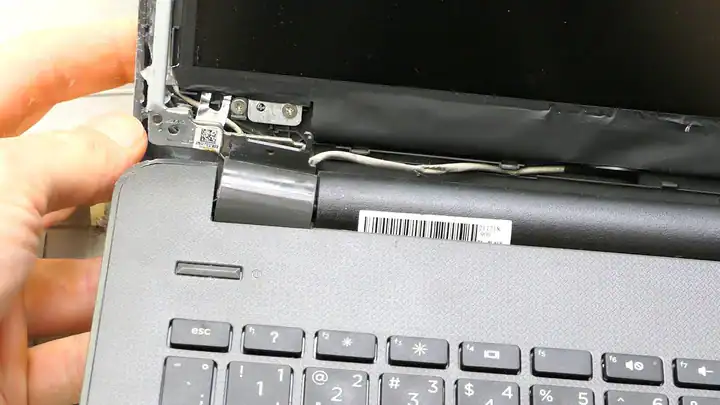
Close up of a damaged laptop hinge

It usually starts with a sound. A subtle click. A tiny snap. Perhaps you notice that the screen of your laptop feels a little looser than it did yesterday, or there is a slight separation in the plastic near the bottom corner of your display. Most people shrug it off. After all, the computer still turns on, the software still runs, and the screen still displays your work. Why worry?

This thought process is exactly why so many users end up frantically searching for a laptop hinge repair near me when it is already too late. What begins as a minor mechanical annoyance rapidly escalates into a catastrophic hardware failure. In the modern laptop repair industry, broken hinges are among the top three most common physical failures we see, sitting right alongside battery degradation and liquid spills.

But why do they break? Is it poor manufacturing, planned obsolescence, or user error? More importantly, how does a seemingly simple mechanical joint dictate the survival of your laptop’s most expensive component—the LCD panel? In this comprehensive guide, we are going to dissect the anatomy of a laptop hinge, explain the exact physics of why they fail, and detail the terrifying “domino effect” that turns a minor chassis crack into a major financial headache.

The Anatomy of a Laptop Hinge: It’s Not What You Think

When you hear the word “hinge,” you likely picture the solid brass or steel contraptions holding up the doors in your house. Because of this, when a laptop lid becomes wobbly or the plastic casing pops open, users naturally assume that the metal hinge itself has snapped in half.

This is almost never the case. To understand the failure, we must first understand how modern laptops are constructed. The pursuit of thinner, lighter, and more aesthetically pleasing laptops has drastically altered their internal engineering. A modern laptop chassis is typically divided into four main sections, referred to by technicians as covers:

  • A-Cover (Top Lid): The back cover of your screen, usually featuring the manufacturer’s logo.
  • B-Cover (Front Bezel): The plastic or glass frame that surrounds the actual LCD viewing area.
  • C-Cover (Palmrest): The surface where your keyboard and trackpad live.
  • D-Cover (Bottom Base): The panel resting on your desk, giving access to the motherboard and battery.

The actual hinges are solid steel components. They are incredibly strong—so strong, in fact, that you could hardly bend them with your bare hands. These steel hinges are bolted to the A-Cover (behind the screen) and the D-Cover (the base) or C-Cover (the palmrest).

But here is the critical flaw: How do you attach a solid steel, high-tension hinge to a thin sheet of injected plastic? Manufacturers solve this by using knurled brass inserts. These are tiny brass nuts that are melted or glued into small plastic posts (bosses) inside the laptop’s casing. The metal hinge is then screwed into these tiny brass inserts.

The Mechanical Reality

“When your hinge ‘breaks’, what has actually happened is that the plastic posts holding those tiny brass nuts have shattered. The steel hinge is perfectly fine, but it has completely ripped out of its plastic anchor points, floating freely inside your laptop’s delicate chassis.”

The Physics of Failure: Why Do The Plastics Shatter?

If the steel hinges are so strong, why do the plastic anchors fail so frequently? The answer comes down to torque, tension, and thermal cycling.

1. The Leverage Problem: Your laptop screen is a lever. When you grab the top corner of a 15-inch or 17-inch display to open it, you are applying a massive amount of leverage to the tiny, 3-millimeter plastic posts holding the hinge at the bottom. If you open your laptop from one corner instead of the center, all that twisting force (torsion) is concentrated on a single hinge, drastically increasing the chance of the plastic shattering.

2. Hinge Stiffening: Over time, the lubricant inside the steel hinge joints dries up. Dust, pet hair, and environmental debris work their way into the mechanism. The hinge becomes stiffer and tighter. Because the metal hinge is now harder to turn, you have to pull harder on the lid to open the computer. This excess force transfers directly to the weakest link: the plastic anchors.

3. Thermal Cycling: Laptops get hot. The hinges are often located right next to the exhaust vents where the CPU and GPU blow out air that can reach 70°C (158°F) or more. The plastic casing expands when hot and contracts when cold. Doing this every day for two years makes the plastic brittle. A brittle plastic post combined with a stiff metal hinge is a recipe for an explosive mechanical failure.

Laptop motherboards and delicate cables
The internal routing of a laptop is extremely dense. A loose hinge threatens every cable nearby.

The Domino Effect: From Broken Plastic to a Smashed Screen

This brings us to the most crucial point of this masterclass, and the reason why a “wobbly screen” is an emergency.

When the plastic anchor snaps, the steel hinge bracket is no longer secured to the chassis. It becomes a loose, sharp piece of heavy metal floating directly underneath your delicate LCD panel and motherboard. If you continue to open and close your laptop, that loose hinge will act like a crowbar inside your computer.

First, it will push against the plastic bezels, causing the B-Cover or bottom casing to pop open. You might try to squeeze it shut with your fingers, but the underlying issue remains. Eventually, the rogue hinge arm will start pressing directly against the back of the LCD panel or the digitizer glass. The next time you close the lid—crack. The pressure point shatters the glass from the inside out. Suddenly, a relatively affordable chassis repair has escalated; you are now looking for a full laptop screen replacement, which can easily triple the cost of the repair.

Furthermore, the hinges are not just structural. They are the pathways for your laptop’s nervous system. The Wi-Fi antenna cables, the webcam wires, and most importantly, the EDP/LVDS video cable (the ribbon that sends the picture from the motherboard to the screen) are routed directly through or wrapped tightly around the hinges.

A loose hinge acts like a pair of scissors. With every opening and closing motion, the metal grinds against these delicate cables. You might start noticing symptoms like:

  • The screen flickering or flashing colors when you adjust the viewing angle.
  • The display going completely black, even though the laptop is clearly powered on.
  • Your Wi-Fi signal suddenly dropping permanently because the antenna wires were severed.
  • The webcam throwing a “device not found” error.

According to repair advocates at organizations like iFixit, designing laptops where the primary stress point is cheap plastic is a major contributor to global e-waste. But until manufacturing standards change, the responsibility of catching these failures early falls entirely on the user.

DIY Fixes vs. Professional Repair: The Superglue Trap

When faced with a separating laptop chassis, many users panic and head to the garage for a tube of Superglue, Gorilla Glue, or two-part epoxy. They squeeze the adhesive into the crack, clamp it down, and hope for the best.

Do not do this.

Superglue is brittle and cannot withstand the immense torsional force of a laptop hinge; it will snap the very next time you open the lid. While high-grade epoxy can be strong enough if applied correctly, the problem lies in the application. Squirting glue blindly into the chassis almost guarantees that you will glue the delicate video cable to the hinge mechanism, or glue the hinge completely shut. When you try to open the laptop later, you will rip the video cable in half or shatter the motherboard itself.

Proper hinge repair requires completely disassembling the laptop, removing the screen, motherboard, and battery, and either replacing the damaged plastic covers entirely with OEM parts or executing a highly precise plastic-welding and epoxy recreation of the mounting bosses. For a deeper dive into the exact chemistry and methodology of proper adhesive repairs, you can read our previous guide on the laptop hinge glue method.

How to Prevent Hinge Failure (Best Practices)

If your laptop is currently healthy, or if you’ve just had it repaired, changing how you physically interact with your machine can add years to its lifespan.

  • Open from the Center

    Never open your laptop by pulling on one of the top corners. Always place your thumb in the exact top-center of the lid (usually where the webcam is) and lift smoothly. This distributes the torque evenly across both hinges.

  • Manage Thermal Output

    Avoid using your laptop on beds, pillows, or blankets. These block the exhaust vents, superheating the chassis and baking the plastic hinge anchors until they become brittle. Use a hard desk or a laptop cooling pad.

  • Listen to Your Machine

    If the hinge feels significantly stiffer than when you bought it, or if it makes a popping sound, stop using it. Having a technician loosen and lubricate the metal hinge before the plastic breaks costs almost nothing compared to replacing a shattered casing.

Don’t Wait for the Screen to Shatter.

If your laptop bezel is popping open or the screen is wobbly, you are days away from a severed video cable or a cracked LCD. We provide expert, warranty-backed chassis reconstruction and hinge repairs.

Get Help at Fix My Gadget Trusted for laptop repairs in Johannesburg.

Leave a Reply

Your email address will not be published. Required fields are marked *