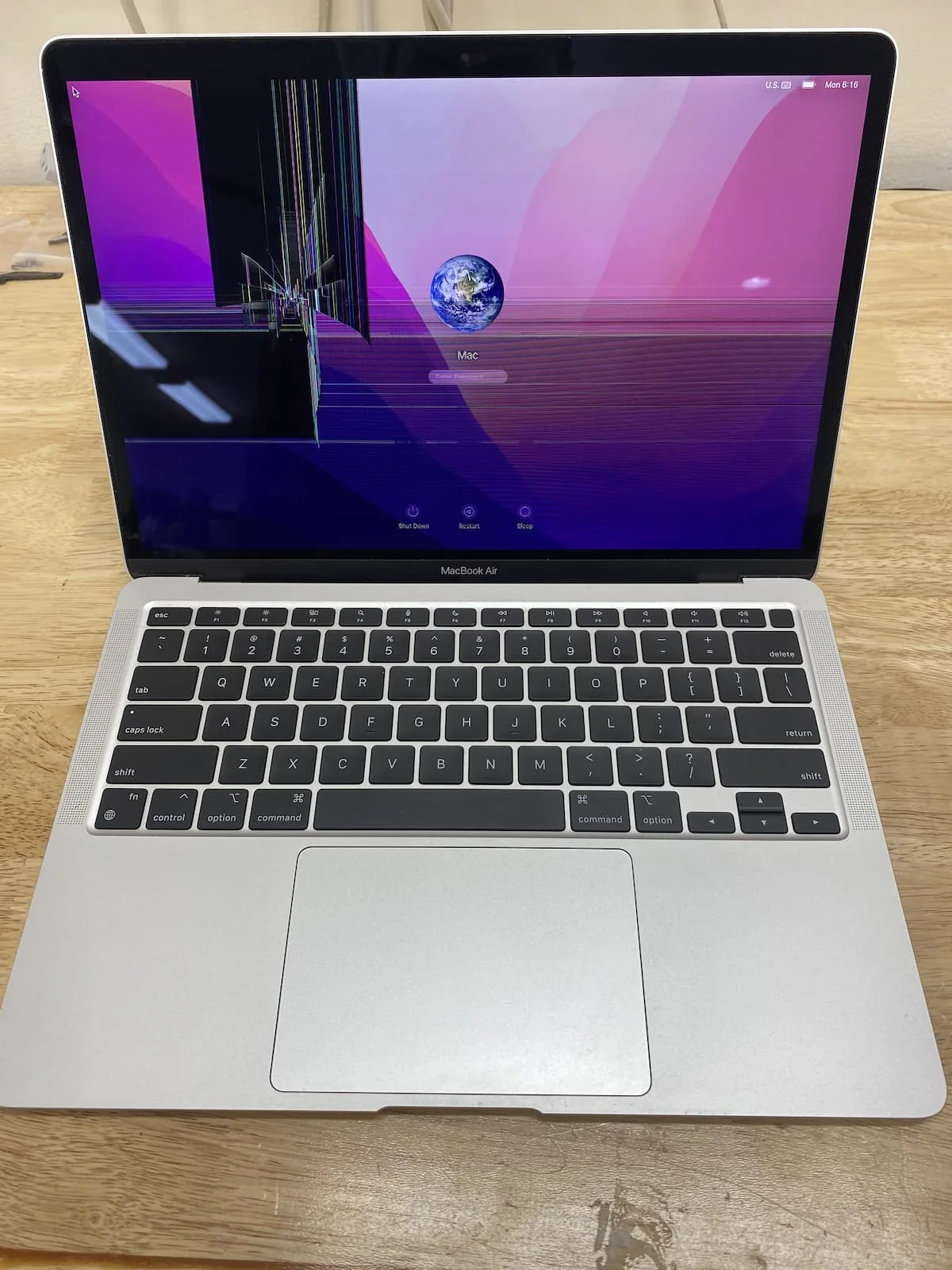
MacBook display repair · Johannesburg
MacBook Screen Repair Johannesburg
MacBook screen repair in Johannesburg must start with model confirmation. A2337, A2338, A2681, A2991 and A2992 displays are not interchangeable, and black-screen symptoms may also come from backlight or logic-board faults.

MacBook screen parts and installation
Need the correct MacBook screen part? Confirm the model first.
A cracked, black, flickering or line-filled MacBook display can be a screen assembly fault, but it can also be backlight, cable or logic-board related. Confirm the model before buying a screen.
Important: Need installation included? Fix My Gadget can supply, fit and test the part after model confirmation.

Repair first, guesswork never
When a MacBook screen fails, the visible damage is only the beginning
A MacBook screen problem can stop your work instantly. One moment the laptop is fine; the next moment the display is black, cracked, covered in vertical lines, flickering, washed out, or showing a glow along the bottom edge. Because the screen is the part you see, it is easy to assume the answer is simple: replace the screen. Sometimes that is correct. Other times the fault is more complicated.
At Fix My Gadget, we treat MacBook screen repair Johannesburg as a proper diagnostic service, not a blind parts swap. The display assembly, backlight circuit, display cable area, hinges, lid damage, liquid exposure and logic-board display output can all create symptoms that look like a screen fault. A careful inspection protects you from paying for the wrong part and helps us decide whether the repair is worth doing.
This is especially important on modern MacBook Air and MacBook Pro models. They are thin, tightly assembled, and expensive to replace. A small impact near the corner can stress the LCD layer. A dent in the lid can distort the panel. A hinge problem can pull on the display cable. Liquid can enter from the keyboard and later affect the display path. The right repair starts by separating the symptom from the real cause.

What this page helps you understand
Symptom map
MacBook screen symptoms and what they can mean
The same symptom can have more than one cause. This table gives you a practical way to understand what may be happening before you book the repair.
| What you see | Possible causes | What we check |
|---|---|---|
| Cracked glass or broken LCD | Impact damage, pressure damage, lid dent, hinge stress | Panel, lid alignment, hinge movement, camera area and model number |
| Black screen but MacBook powers on | Display assembly, backlight fault, display cable path, logic-board display output | External display test, brightness response, image/backlight test and board inspection |
| Vertical lines or coloured bars | LCD layer damage, cable stress, liquid marks, panel failure | Panel condition, lid impact, connector area and repeat behaviour |
| Flickering or screen works at an angle | Cable fatigue, hinge movement, display assembly fault, backlight path issue | Angle test, hinge tension, external display test and model-specific symptoms |
| Stage-light effect at bottom | Backlight cable or display assembly fault on affected designs | Backlight pattern, model year and display cable condition |
| Screen damage after liquid exposure | Corrosion, shorted backlight path, display connector damage, board fault | Liquid inspection before power is applied again |

Before you spend money
Safe checks you can do before booking
You do not need to open the MacBook or force anything. The goal is only to collect useful information and avoid making the fault worse. If the screen is cracked, close the lid gently and avoid pressing the broken area. If liquid was involved, stop using and charging the MacBook immediately.
- Try an external displayIf the MacBook works on an external monitor, the screen assembly or display path becomes more likely. If there is no image anywhere, the fault may be deeper.
- Listen for startup signsFan noise, charging sound, keyboard backlight or trackpad click can show that the machine is alive even when the display is black.
- Check whether the fault changes with lid angleIf the display works only at certain angles, the hinge/display cable path may be involved.
- Look for lid dents or corner impactSmall dents matter. A damaged lid can put pressure on a new panel if it is not checked.
- Back up if the machine still worksIf the MacBook can still display externally, back up important files before any repair.
Do not keep restarting a MacBook that has liquid damage or burning smell. Repeated power attempts can turn a repairable problem into board damage.
Model matters
MacBook Air and MacBook Pro screens are not all the same
MacBook screen replacement depends heavily on the model. A 2017 MacBook Pro, an M1 MacBook Air, an M2 MacBook Air and a 14-inch MacBook Pro do not use the same screen assembly, pricing or repair risk.
Very common in South Africa. Screen damage often comes from pressure, bag impact or closing the lid on small objects. Correct model matching is essential.
Thinner display assemblies and premium parts mean careful quoting matters. A cheap wrong part can create fit, colour or quality problems.
Can involve display assembly faults, backlight/cable symptoms or black screen behaviour. We test before quoting.
Premium display assemblies can be costly. Repair value depends on the exact model, year and condition of the rest of the machine.
Price clarity
What affects MacBook screen repair cost?
People often ask for one fixed price, but MacBook screen repair cost changes by model and part. The safest quote comes after we identify the exact MacBook and inspect whether the screen assembly is the only fault.
The biggest cost factors are the MacBook generation, screen size, display assembly type, availability of quality parts, condition of the lid and hinges, and whether there is liquid or board damage. A cracked MacBook Air display is not priced the same as a newer MacBook Pro display. A black screen caused by board-level backlight failure is not the same job as a cracked panel.
| Cost factor | Why it changes the quote |
|---|---|
| Exact model | MacBook Air, Pro, M1, M2, M3 and Intel models use different assemblies. |
| Part quality | Low-grade displays may look cheaper now but can fail, fit badly or look poor. |
| Lid or hinge damage | A bent lid or tight hinge can damage a replacement screen if not corrected. |
| Liquid damage | Corrosion can affect the display connector, backlight path or logic board. |
| Data and testing needs | We test display output and basic operation before returning the device. |
For a dedicated price breakdown, read our MacBook screen repair cost guide.


Cheap can become expensive
Why part quality matters on MacBook screen repairs
A MacBook display is not only a piece of glass. It is a complete visual system that affects brightness, colour, webcam alignment, lid fit, sleep/wake behaviour and daily reliability. The cheapest quote can be tempting, but a poor display or rushed installation can create new problems.
We are careful about part matching because customers do not only need the screen to turn on. They need a MacBook that opens correctly, closes safely, displays properly and can be trusted for work. A low-quality repair may save money on day one and cost more later if the panel fails, the lid does not sit right, or the hinge area was ignored.
How the repair works
The Fix My Gadget MacBook screen repair process
The process is designed to protect your device, your money and your data.
Send photos of the screen, the MacBook model if visible, what happened and your area in Johannesburg.
We inspect the display behaviour, physical condition, lid, hinge area and related symptoms.
You receive repair options before work proceeds. The diagnostic fee is waived when the approved repair proceeds.
After approval, the screen repair is completed and the MacBook is tested for display, sleep/wake and basic function.
Useful references
Helpful resources before you decide
These external resources help you understand official support routes, backup steps and responsible recycling if a device is beyond economical repair.
MacBook screen repair cluster
Related MacBook screen guides
These pages answer deeper questions while this page remains the main repair service page for Johannesburg customers.
FAQ
MacBook screen repair questions
The price depends on the exact MacBook model, screen assembly type and part quality. Many MacBook screen repairs start from the mid-thousands of rand and newer Pro models can cost more. We inspect first and quote before repair.
Yes, but it must be diagnosed first. A black screen can be the display assembly, backlight path, display cable area, liquid damage, firmware behaviour or a logic-board display fault.
Yes, we assist with MacBook Air and MacBook Pro display faults including Apple Silicon models, subject to inspection and part availability.
It is risky. A cracked display can worsen, damage the hinge area, expose the display layer or become unsafe to close. Back up your data and get the device inspected.
Most screen repairs do not require access to personal files. If login is needed for final testing, a temporary guest profile is recommended where possible.
The diagnostic fee is R350 and it is waived when you approve and proceed with the repair.
Yes. Pickup and delivery across Johannesburg is available as a paid service quoted upfront before collection.
MacBook repair images
Real MacBook screen and lid inspection photos
MacBook screen repair is easier to quote properly when the lid, screen assembly, hinge pressure and impact marks are inspected together. These images support the same repair-first, diagnosis-first approach used on our MacBook pages.


Book the inspection
Need MacBook screen repair in Johannesburg?
Send the MacBook model, a clear photo of the screen fault and your area. We will advise the next step and quote pickup if needed.
Content quality promise
Written to help before it sells.
Fix My Gadget repair guides are written from real workshop patterns: cracked screens, failed batteries, liquid damage, no-power faults, slow laptops, data risk and replacement decisions. The goal is to help you understand the likely repair path before you spend money.
We avoid pretending that every device can be diagnosed online. When a fault needs testing, we say so clearly and invite you to send the model, photos and symptoms before booking.
- We explain symptoms, risks and safe checks in plain language.
- We separate repair advice from product-shopping advice.
- We quote after inspection and do not recommend unnecessary parts.
- We keep Johannesburg location, pickup and diagnostic information visible.
Visit or arrange pickup
Fix My Gadget is based in Kibler Park, Johannesburg South
Workshop drop-off is available by arrangement, and paid pickup/delivery can be quoted upfront for Johannesburg areas. Send your device model, photos of the fault and your area on WhatsApp before coming through.