

Spilled Coffee on Your MacBook? Why Rice Won’t Save It (And What Will)
The definitive 2025 guide to liquid damage recovery for Johannesburg professionals. Save your data, your logic board, and your R40,000 investment.
 By The Senior Tech Team
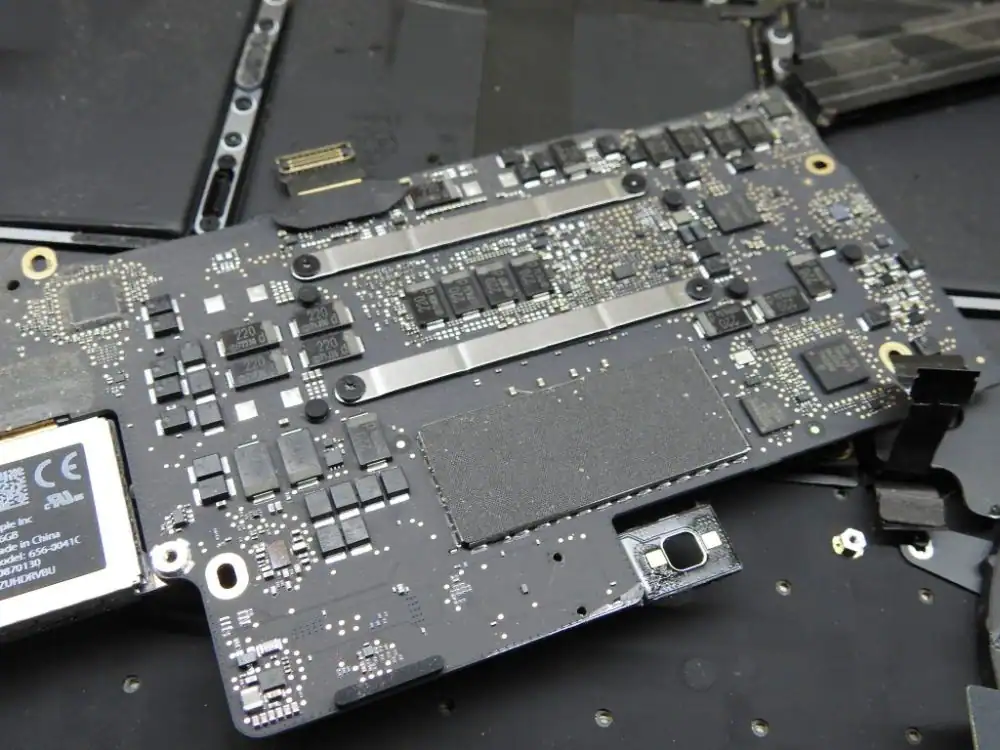
It happens in slow motion. Your hand bumps the mug. The splash hits the keyboard. The screen goes black. In that split second, you aren’t just worried about a laptop; you’re worried about your project deadlines, your client files, and the R30,000+ it will cost to replace your MacBook Pro.
If you are reading this on your phone while your wet MacBook sits next to you, stop everything and read this guide carefully. What you do in the next hour will determine if your laptop lives or dies.
We have repaired over 5,000 liquid-damaged devices at our Sandton and Johannesburg workshops. We have seen everything from wine spills to swimming pool accidents. This article is the brutal truth about liquid damage—why the “internet hacks” are dangerous, and how professional chemistry is the only way to reverse the damage.
1. The “Rice Myth” Debunked: Why You Must Stop Doing This
🛑 STOP! DO NOT PUT IT IN RICE.
This is the most persistent and damaging myth in tech repair. Placing your MacBook in a bag of uncooked rice does absolutely nothing to remove the liquid trapped deep inside the logic board layers.
Here is the scientific reality: Rice is a passive desiccant with very low absorption capabilities. It might dry the outside of the case, but it cannot pull moisture out from under the microscopic chips on the motherboard.
Worse, it causes damage: Rice contains starch dust. When this dust enters your charging ports and keyboard, it mixes with the sticky liquid (especially coffee, juice, or wine) to create a cement-like paste. We frequently open “rice-treated” MacBooks to find the cooling fans clogged with rice starch, which ruins the thermal management system even if the liquid didn’t kill the board.
2. The Real Enemy: It’s Not Water, It’s Electricity + Corrosion
The Formula for Disaster:
Liquid + Electricity = Electrolysis (Corrosion)
Water itself isn’t what kills the laptop instantly; it’s the electricity traveling through the water. Water is a conductor. When it touches your logic board while the battery is connected, it creates short circuits, sending 12 volts of power into a chip designed for 1 volt. This fries components instantly.
Even if the laptop is off, the battery is still sending power to the board. The moment liquid hits, a chemical process called Electrolysis begins. The metal copper traces on your motherboard literally start to dissolve and grow green oxidation (corrosion).
The “It Still Works” Trap: Sometimes, you spill water, dry it off, and the laptop turns on. You think you’re lucky. You aren’t. The liquid is still inside, slowly eating through the copper traces like rust on a car. A week or a month later, the laptop will die suddenly and permanently. This is why immediate professional cleaning is non-negotiable.
3. Emergency First Aid: What To Do Right Now
If the spill just happened, follow these steps immediately to increase your chances of survival:
-
1Turn It Off Immediately
Do not save your work. Do not shut down gracefully. Hold the power button for 10 seconds until the screen goes black. Cutting power stops the electrolysis.
-
2Unplug Everything
Remove the charger, USB drives, dongles, and any peripherals.
-
3The “Tent” Position
Open the laptop lid and flip it upside down like a tent (A-frame shape) on a towel. This encourages liquid to drain away from the delicate logic board and towards the keyboard/vents.
-
4Do Not Turn It Back On
This is crucial. Even if it looks dry after an hour, liquid is trapped under the battery and chips. Turning it on sends electricity through wet components, guaranteeing a short circuit.
4. The Only Real Cure: Ultrasonic Chemical Cleaning
At Fix My Gadget in Johannesburg, we don’t just “wipe down” the board. We use the same process used in aerospace and medical electronics repair. Here is how we save a R40,000 MacBook Pro:
Step 1: Micro-Inspection
We remove the logic board and inspect it under a 1000x digital microscope to identify every single point of corrosion and burnt components.
Step 2: Ultrasonic Bath
The board is submerged in a specialized chemical solution inside an industrial Ultrasonic Cleaner. High-frequency sound waves create microscopic bubbles that blast away corrosion from underneath the chips where brushes can’t reach.
Step 3: Alcohol Displacement
The board is bathed in 99.9% Isopropyl Alcohol to displace any water and cleaning solution, ensuring it is chemically pure and dry.
Step 4: Micro-Soldering
Our engineers replace burnt capacitors, resistors, and chips (like the backlight driver or charging IC) using advanced soldering techniques.
5. The Economics: Repair vs. Replace
If you take a liquid-damaged Mac to an official store, they will often quote you a “Tier 4” repair cost, which essentially replaces the entire logic board, top case (keyboard/battery), and Touch ID. This often costs R20,000 to R30,000—basically the price of a new machine.
The Fix My Gadget Alternative:
Because we repair the existing board rather than replacing it, our liquid damage recovery services typically range from R2,500 to R6,500 depending on the severity.
- Saving: You save up to 80% compared to buying a new MacBook.
- Data: Repairing the board is often the only way to recover your data, as modern MacBooks have soldered SSDs that cannot be removed.
- Environment: Repair is far greener than e-waste.
6. What About Sticky Keys?
Often, the logic board survives, but the keyboard becomes sticky due to sugar in coffee or soft drinks. For modern MacBooks (2016+), the keyboard is riveted into the aluminum top case. Replacing it is a difficult, labor-intensive job that many shops refuse to do.
We specialize in **keyboard assembly replacement**. If your Mac runs fine but the keys are crunchy, we can replace just the keyboard layer, saving you from replacing the entire expensive aluminum palm rest assembly.
Don’t Wait. Corrosion Never Sleeps.
Every hour you wait allows corrosion to eat further into your logic board traces. The sooner we get the board into the ultrasonic bath, the higher the success rate (currently 90% for devices brought in within 48 hours).
Fix My Gadget (Pty) Ltd. is Johannesburg’s premier component-level repair centre.
Service Areas: Sandton, Rosebank, Midrand, Randburg, Bedfordview, and Johannesburg South.