

Is Your MacBook Screen Failing? Fixing the Infamous “Flexgate” Stage Light Issue
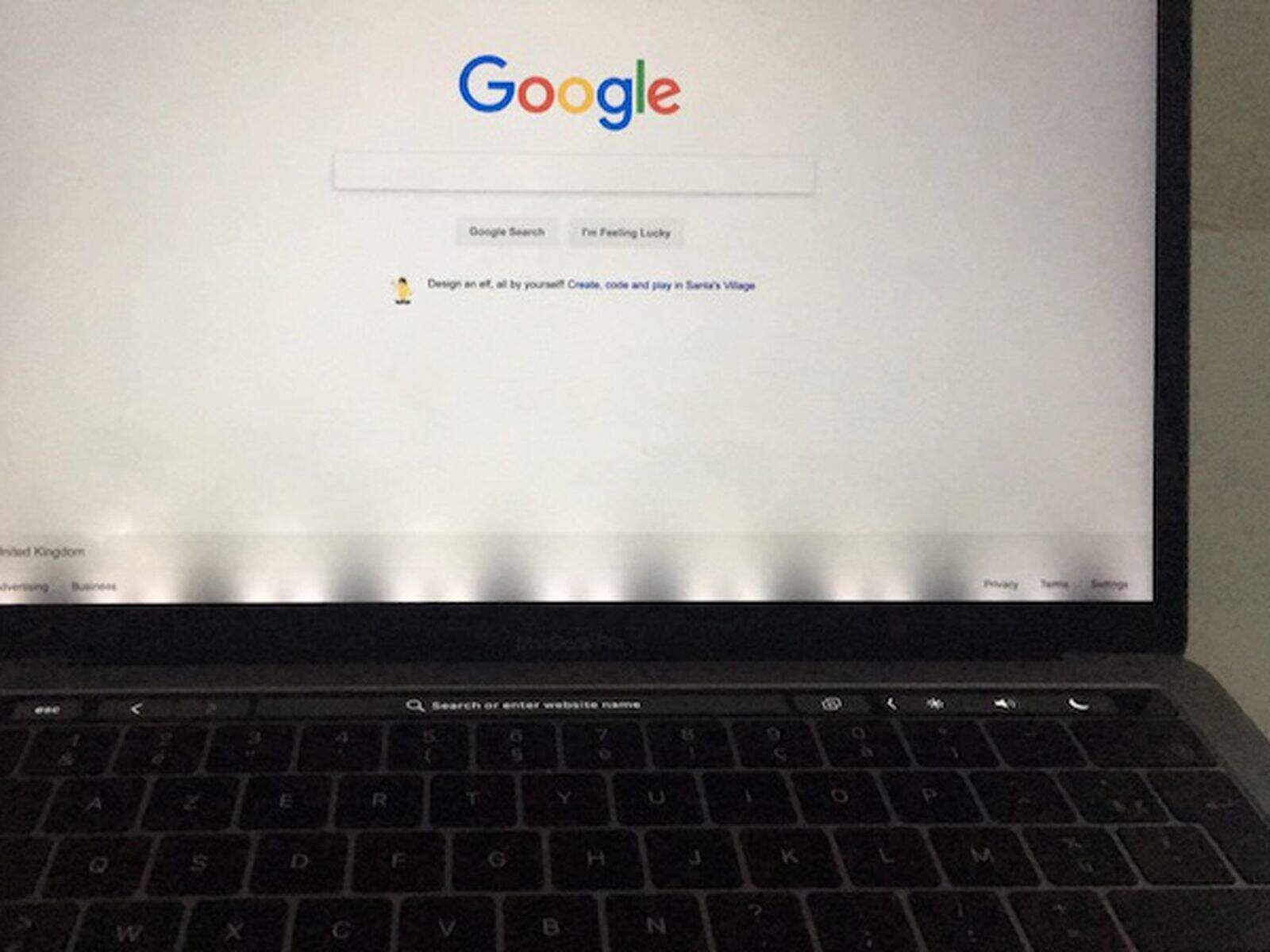
You open your MacBook Pro, and instead of a smooth, uniform display, you see uneven shadows at the bottom of the screen—looking remarkably like stage lights illuminating a curtain. Or perhaps your screen works fine when slightly open, but goes completely black when you open it past a 90-degree angle.
This isn’t a ghost in the machine. It’s a well-documented hardware flaw known in the tech community as “Flexgate.” While Apple has acknowledged it in some models, thousands of users in South Africa are left wondering: Is my MacBook broken forever? And how much will this cost to fix?
What Exactly is “Flexgate”?
“Flexgate” refers to a design issue affecting MacBook Pro models released between **2016 and 2018**. In these laptops, the flexible ribbon cable that connects the display to the logic board (specifically the backlight cable) was designed slightly too short.
Every time you open and close your laptop lid, this cable wraps around the hinge controller board. Over time—typically after 1–2 years of use—the tension causes the cable to tear or wear down.
The Two Main Symptoms:
- The Stage Light Effect: Uneven backlighting at the bottom of the screen, creating alternating bright and dim spots.
- Blackout at Angle: The screen works when barely open but turns completely black when opened to a normal viewing angle.
Which Models Are Affected?
While any laptop cable can wear out, Flexgate is most prevalent in the following models. Check the bottom of your MacBook case for the “A” model number:
- MacBook Pro (13-inch, 2016, Two/Four Thunderbolt 3 Ports) – Model A1706 / A1708
- MacBook Pro (13-inch, 2017) – Model A1706 / A1708
- MacBook Pro (15-inch, 2016-2017) – Model A1707
*Note: Apple did silently fix this in 2018 models by extending the cable length by 2mm.*
Your Repair Options in Johannesburg
Many repair shops will tell you that the cable is fused to the screen, so you must replace the entire display assembly (costing upwards of R8,000). While replacing the screen is the “official” fix, expert technicians have other ways.
Option 1: Micro-Soldering Cable Repair (The Specialist Fix)
At Fix My Gadget, our technicians can sometimes cut out the damaged section of the backlight cable and splice in a new, extended connection using advanced micro-soldering. This is significantly cheaper than a new screen but requires high-level expertise.
Option 2: Full Display Assembly Replacement (The Guaranteed Fix)
If the cable damage is too severe, replacing the full display assembly is the most reliable option. We use genuine LCD assemblies that restore your MacBook to factory condition, often at 30-40% less cost than official store prices.
Is It Worth Fixing?
Absolutely. A MacBook Pro from 2016 or 2017 is still a powerful machine capable of heavy video editing and coding tasks.
A macbook screen repair cost of R4,500 – R6,500 is a fraction of the price of a new MacBook Pro (R30,000+). Repairing extends the life of your device by another 3–5 years, making it a smart financial decision and an environmentally friendly choice.
Fix Your MacBook Screen Today
Don’t let the “stage lights” dim your productivity. Whether you need a micro-soldering fix or a full screen replacement, Fix My Gadget is Johannesburg’s trusted expert for complex Apple repairs.